Allegretto: A Creative Font for Web Design
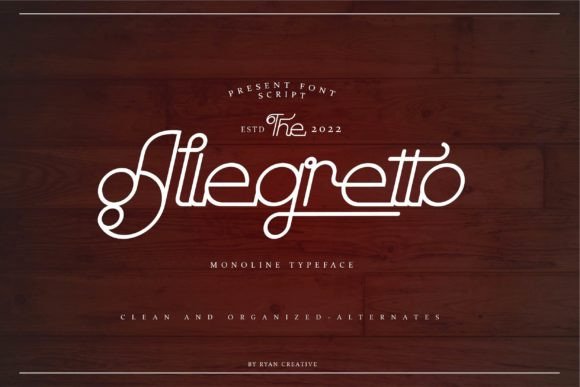
As a web designer, I’m always on the lookout for fonts that bring personality to a site without sacrificing readability. Allegretto, a monoline script typeface, has quickly become one of my go-to choices for digital projects. Its clean lines and modern charm make it perfect for headers, buttons, and other design elements where a touch of elegance is needed.
Testing Allegretto in a Hero Section
I recently tested Allegretto on a hero section for a boutique online store. The font’s smooth curves and consistent stroke width gave the headline a polished look that stood out against a bold background image. It felt both professional and approachable, which was exactly what the brand needed.
On mobile devices, the font remained legible even at smaller sizes. I made sure to test it across different screen resolutions and found that it maintained its clarity without appearing too thin or too thick. This is crucial for responsive design, where text needs to look good on all devices.
Using Allegretto for Call-to-Action Buttons
Another area where Allegretto shines is in call-to-action buttons. I used it for a “Shop Now” button on a product landing page, pairing it with a simple sans serif font for the surrounding text. The contrast helped guide the user’s eye toward the button while keeping the overall design cohesive.
The font’s weight and spacing made it ideal for short phrases like “Sign Up” or “Learn More.” It added a bit of flair without overwhelming the user. I also appreciated how it looked on dark backgrounds—its lightness didn’t get lost, and it still felt part of the design rather than an afterthought.
Pairing Allegretto with Other Fonts
When working on a portfolio website, I paired Allegretto with a clean, modern sans serif font for the body copy. This combination created a nice balance between creativity and readability. The script font added character to the headings, while the sans serif kept the rest of the content easy to scan.
I also experimented with a serif font for a more editorial feel. The result was elegant but not too ornate. It worked well for blog headers and featured sections, giving the site a sophisticated look without being too flashy.
Considerations for Web Use
While Allegretto is great for display purposes, it’s not ideal for long paragraphs of text. I wouldn’t recommend using it for body copy on a blog or news site. However, as a decorative font, it can be used effectively in headlines, logos, and other visual elements.
Accessibility is another important factor. I made sure to test the font on various color combinations to ensure it met contrast standards. It performed well on both light and dark backgrounds, which is essential for a font that will be used across different design contexts.
Font Pairing and Design Flexibility
One of the things I love about Allegretto is how versatile it is. Whether I’m designing a creative portfolio or a course sales page, it adapts well to different styles. It pairs nicely with both serif and sans serif fonts, making it a valuable addition to any design toolkit.
For a recent project, I used it in a campaign landing page for a new product launch. The font’s fluidity matched the theme of the campaign, and it helped create a sense of movement and energy. It was especially effective when placed over an image banner, where it didn’t compete with the visuals but still commanded attention.
Final Thoughts on Allegretto
Allegretto is a font that brings both style and functionality to web design. It’s perfect for headers, buttons, and other design elements where a bit of personality is needed. Its clean, modern look makes it suitable for a wide range of projects, from e-commerce sites to personal portfolios.
Whether you’re a web designer, UI designer, or digital product creator, Allegretto is worth adding to your font library. It’s a freebie that doesn’t compromise on quality, and it’s sure to elevate your next design project. Just remember to use it wisely—pair it with other fonts when needed, and avoid using it for long blocks of text. With the right approach, Allegretto can help you create beautiful, engaging websites that stand out from the crowd.